
NERUMI DOCTOR REPORT
Baby doctor report: turn daily logs into a clear appointment summary
Nerumi gathers the period you choose into one readable PDF, so you can show your pediatrician what is typical, what changed and which questions you want to cover—without scrolling through dozens of screens.
- Your chosen date range
- Brief, standard or detailed PDF
- Preview before sharing
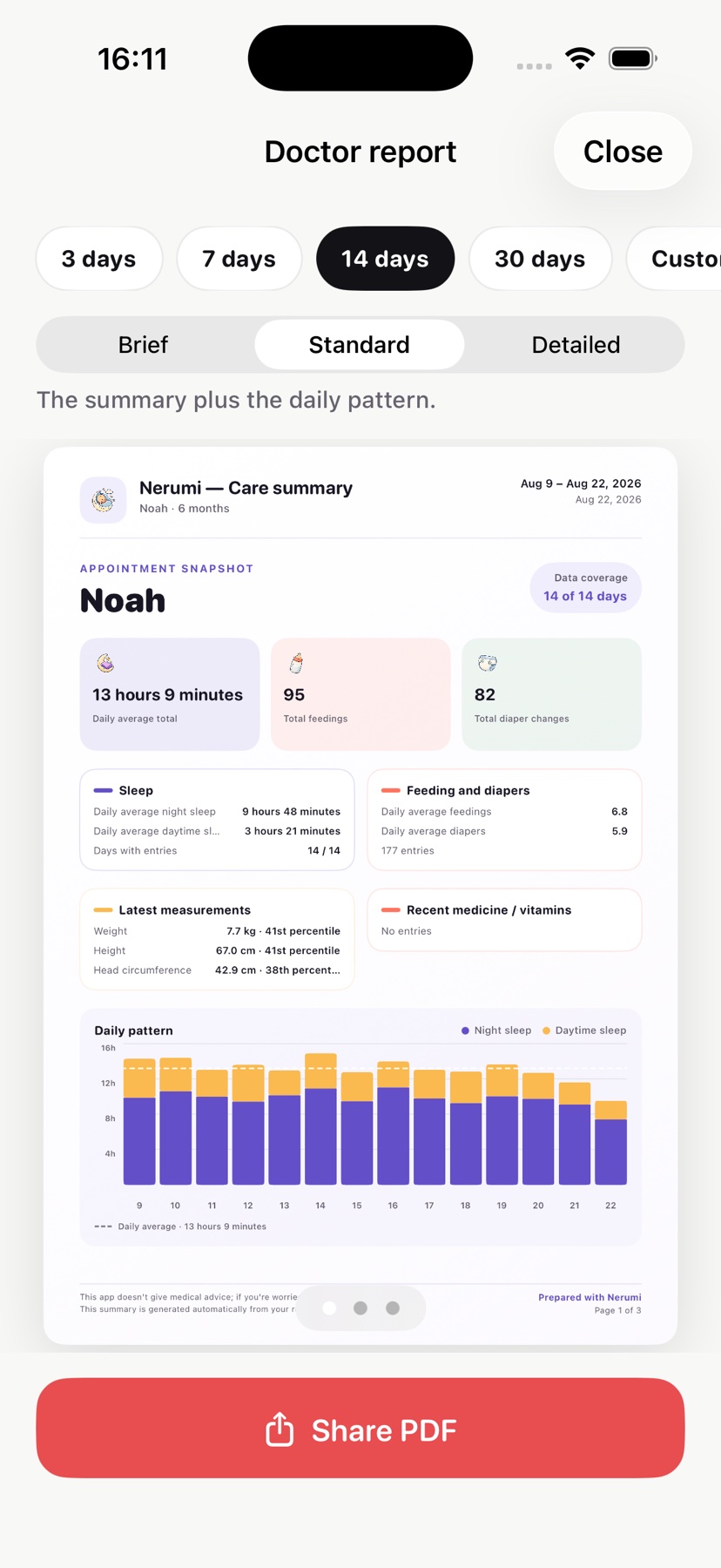
Real app screen. Noah and the visible entries belong to a sample profile.
Prepared by Samet Eraslan
Last source check:
A CLEAR THREE-STEP FLOW
Turn a busy log into an appointment-ready summary
The goal is not to show more data. It is to make the usual pattern, recent changes and open questions easier to discuss.
- 01Choose the period
Select the last 3, 7, 14 or 30 days, or set a custom date range.
- 02Choose the detail level
Brief gives the headline; standard and detailed views add daily context. Notes marked for your doctor can become a questions page.
- 03Preview and share
Check every page in the app, then print the PDF or share it before the appointment.
WHAT IS IN THE REPORT?
Only the information you recorded, grouped for quick reading
Nerumi does not invent missing data. Sections appear when there is something to show, and the daily breakdown expands with the detail level.

Sleep
Day and night distribution, daily totals and the period average

Feeds and diapers
Daily counts and an at-a-glance view of changes across days

Growth
Latest weight, length and head circumference, when recorded

Medicine and temperature
Recorded medicines or supplements and temperature readings over time

Vaccines
Doses marked as given and items not present in the app record

Questions
Notes you marked to ask at the appointment
INTERACTIVE APPOINTMENT PLANNER
Clarify the main point before you go
The one-page draft updates as you type. Nothing is sent or saved by this webpage; closing the page clears it.
Baby’s name and age
The main point you want to discuss
What changed, when it began and how it differs from usual
Write ‘None’ if there are no medicines or supplements
Questions you want to ask
This draft is not a medical record or a clinician’s report. Bring official health and vaccination records separately.
USEFUL, WITH CLEAR LIMITS
What this PDF can do—and what it cannot
Helps you prepare for the conversation
- Shows the usual pattern and recent change together.
- Keeps medicine names, dates and questions in one place.
- Replaces a stack of screenshots with a readable PDF.
Does not replace a medical record
- It does not diagnose, interpret symptoms or recommend treatment.
- It is not a report written by a clinician.
- It does not replace the official vaccination or health record.
PRIVACY
Your summary is created from the records on your device
Nerumi does not keep an account database of your care records on its own servers. Records stay on your devices and, if you choose iCloud, sync through your Apple account. You decide who receives the PDF.
Read the Privacy Policy
A BETTER-PREPARED APPOINTMENT
Turn daily records into a summary you can use in the room
Doctor Report is a Nerumi Premium feature. You can review the selected period and pages before creating the PDF.
SOURCES
Sources and official guidance
These sources support the general approach to appointment preparation, question lists and medication records. Feature details were checked against the current Nerumi app.
- AHRQ — Be More Engaged in Your Healthcarelast reviewed November 2024 · accessed September 2026
- AHRQ — Medication Management patient fact sheetaccessed September 2026